Prusa Monitoring
Kotlin Multiplatform app for monitoring Prusa 3D printers — real-time status, live camera feeds, print control, and smart local/cloud failover across Android, iOS, and Desktop.
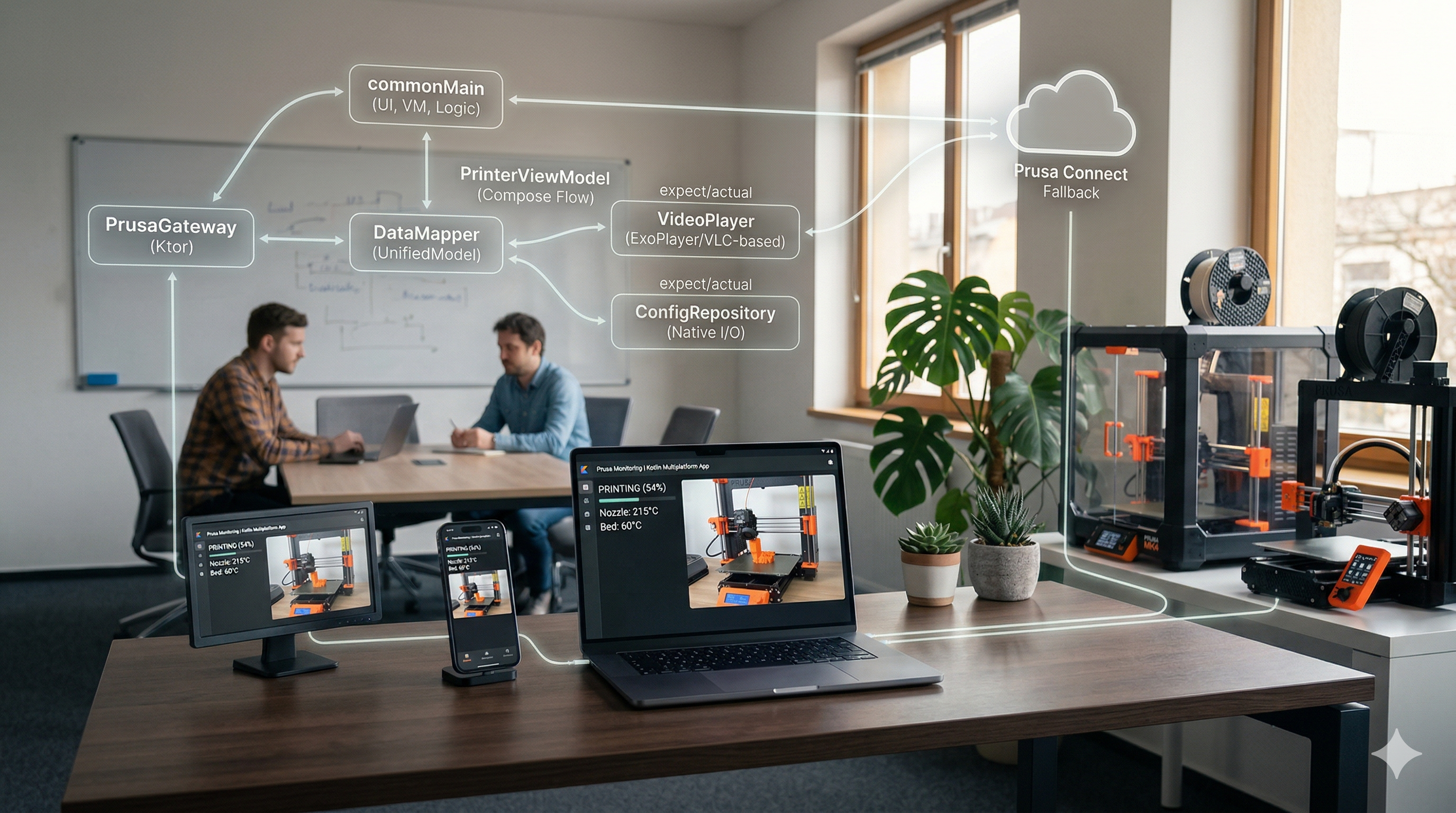
Context
Prusa printers expose two separate APIs depending on your network context: PrusaLink for direct local network access, and Prusa Connect for cloud-based monitoring when you’re away from home. Switching between them manually is friction. The official apps don’t handle this gracefully.
This is a personal project — a monitoring app that works whether you’re on the same network as the printer or not, with a live camera feed, real-time print status, and print control, all in a single interface.
Architecture
The app is built with Kotlin Multiplatform (KMP) and Compose Multiplatform, targeting Android, Desktop (Linux/JVM), and iOS. Almost all code — UI, ViewModels, networking, data models — lives in commonMain. Platform-specific code is limited to two expect/actual implementations: VideoPlayer (RTSP stream rendering) and ConfigRepository (native file I/O for storing printer credentials).
Key components:
PrusaGateway— The network layer. On each status poll, it pings the printer’s local PrusaLink endpoint with a 2-second timeout. If that succeeds, it uses the local API for the rest of the session. If it fails, it falls back to Prusa Connect’s cloud API. The active mode is tracked and used to route snapshot requests correctly. AMutexensures only one live-status fetch runs at a time.PrinterViewModel— State management and the 5-second polling loop. Handles print job control operations (pause, resume, cancel) and file browsing. All state is exposed as ComposeStateFlow— the UI is purely reactive.DataMapper— Converts the two API response formats (PrusaLinkDTOandPrusaConnectDTO) into a single unifiedPrinterStatusdomain model. The rest of the app never sees the API distinction.PrinterStatus/PrinterState— The unified domain model.PrinterStateis a sealed enum covering all meaningful printer states (printing, idle, paused, error, etc.) regardless of which API reported them.
Key Decisions
KMP over separate native apps: The alternative was separate Android and iOS codebases. KMP lets the business logic, networking, and state management live once in commonMain — the only thing that’s platform-specific is the video player and config storage, both of which genuinely need to be native. This isn’t code-sharing for its own sake; it’s the right boundary for this problem.
expect/actual only for true platform requirements: A common KMP anti-pattern is using expect/actual as a general escape hatch. Here it’s used strictly for things that have no cross-platform solution: RTSP video rendering (ExoPlayer on Android, VLC-based on Desktop) and file I/O paths. Business logic stays in commonMain unconditionally.
Local-first with cloud fallback over cloud-first: Prusa Connect introduces latency (~1-2s round trips through their servers vs. near-zero local). The gateway always tries local first with a tight timeout. This means when you’re home, the app is fast and doesn’t depend on Prusa’s uptime. Cloud is a fallback, not the default.
Mutex on status fetch: The 5-second polling loop and manual refresh can race. Rather than cancelling one and starting the other, a Mutex makes the second caller wait for the first to finish — correct behavior with no duplicate network requests.
What’s in Progress
The project is actively developed. On the roadmap: a local files tab via PrusaLink, a caching layer to reduce reliance on Prusa Connect, manual axis control, and CI/CD pipelines for both Google Play and the App Store. The architecture is structured to support comprehensive unit testing, which is currently being implemented to validate cross-platform business logic.
Next project
Climate Risk Data Platform →